

An end-to-end observability tutorial for AI agents: traces, threads, feedback, datasets, and experiments — with a live demo.
An agent loop, a set of tools, integration with MCP, and a reasoning model make every run of your AI agent unique. We all know that this behavior is non-deterministic. It creates a specific operations problem. You cannot reproduce a failure from the input alone. You need a record of every step.
This article shows how to build that record with LangSmith, LangChain’s observability and evaluation platform. You will build a small agent, instrument it step by step, run it live, and finish with traces, feedback, and a regression dataset in your LangSmith workspace.
The operations problem we are trying to solve: an agent is non-deterministic
A single LLM call is easy to debug. You send a prompt, you get a response.
An agent is different. An agent runs a loop of Think → Act → Observe.
The model picks a tool. The harness (e.g. Claude Code) runs it. The model sees the result and picks the next step. Three problems follow from this design. The agent can pick the wrong tool or loop on a failing step while the final output still looks correct. The agent decides its own cost, so one run makes three tool calls and the next can make ten. Small per-step errors compound over long tasks.
Traditional logging does not show structure, cost, or timing. You need structured traces.
What LangSmith records
LangSmith organizes data into a few core terms. The definitions below come from the LangSmith observability concepts documentation.
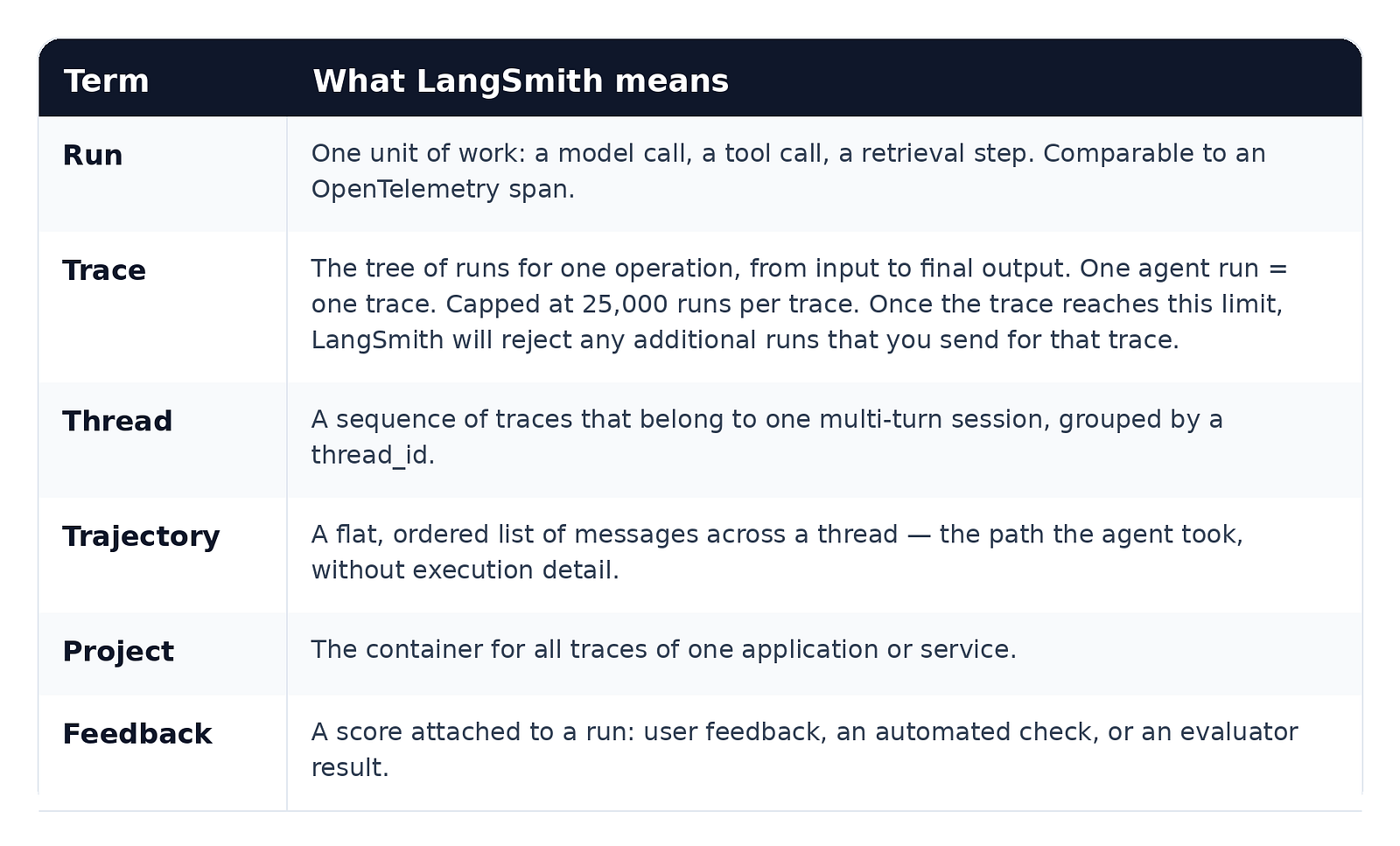
The terminology is deliberately OpenTelemetry-like. Runs are spans, traces are trace trees, and LangSmith accepts standard OpenTelemetry instrumentation alongside its own SDKs.
Prerequisites
- Python 3.10 or later
- A LangSmith account at smith.langchain.com and an API key (Settings → API Keys)
- A model provider key. The demo uses a free OpenRouter model,
nvidia/nemotron-3.5-lightning:free
Step 1: Install the SDK and set the environment
Install the packages:
pip install -U langsmith openaiSet the environment variables:
export LANGSMITH_TRACING="true"
export LANGSMITH_API_KEY="lsv2_pt_..."
export LANGSMITH_PROJECT="langsmith-medium-article"
export OPENROUTER_API_KEY="sk-or-..."  # a free OpenRouter key. The open-source model runs via OpenRouterRouter key
`LANGSMITH_TRACING=true` is the switch that turns recording on. `LANGSMITH_PROJECT` sends all traces to a named project; if you omit it, LangSmith creates a default project automatically.
If your account is outside the US, also set the endpoint for your region, for example `LANGSMITH_ENDPOINT=”https://eu.api.smith.langchain.com"` for EU accounts. Do not add a trailing slash. A region mismatch is the most common cause of authentication errors on the first run.
These are terminal commands, so they use the `export` keyword. If you prefer a `.env` file, write plain `KEY=value` lines without `export` and load it in your script with `python-dotenv`. And if your console ever shows `Failed to export span batch … 401`, your `LANGSMITH_ENDPOINT` region does not match your API key.
Step 2: Build the agent, and run it
The demo agent answers questions about internal meeting notes. It has two tools and a step limit. The only LangSmith-specific lines are the import and the client wrapper:
import json
import ast
import os
from openai import OpenAI
from langsmith.wrappers import wrap_openai
from langsmith import traceable
from langsmith import Client

client = wrap_openai(
    OpenAI(
        base_url="https://openrouter.ai/api/v1",
        api_key=os.environ["OPENROUTER_API_KEY"],  # the open-source model runs via OpenRouter
    )
)

MODEL = "nvidia/nemotron-3.5-lightning:free"
```

`wrap_openai` records every model call automatically: the exact messages sent, the response, the token counts, and any tool calls. The rest of the agent is plain OpenAI tool-calling:

```python
SYSTEM_PROMPT = (
    "You are a support agent. Answer only from the meeting notes. "
    "Use the calculator for arithmetic. Stop when you have the answer."
)

TOOLS = [
    {"type": "function", "function": {
        "name": "search_notes",
        "description": "Search internal meeting notes by keyword",
        "parameters": {"type": "object", "properties": {
            "query": {"type": "string"}}, "required": ["query"]}}},
    {"type": "function", "function": {
        "name": "calculate",
        "description": "Evaluate an arithmetic expression",
        "parameters": {"type": "object", "properties": {
            "expression": {"type": "string"}}, "required": ["expression"]}}},
]

NOTES = {
    "budget": "Q3 budget review. Marketing spend: $42,000. Infra spend: $18,500.",
    "roadmap": "Q4 roadmap sync. Teams agreed to delay the mobile redesign to Q1.",
}

def search_notes(query: str) -> str:
    for key, text in NOTES.items():
        if key in query.lower():
            return text
    return "No notes found."

def calculate(expression: str) -> str:
    import ast
    try:
        node = ast.parse(expression, mode="eval")
        return str(eval(compile(node, "<expr>", "eval")))  # demo only
    except Exception as e:
        return f"Error: {e}"

def execute_tool(name: str, arguments: str) -> str:
    args = json.loads(arguments)
    if name == "search_notes":
        return search_notes(args["query"])
    if name == "calculate":
        return calculate(args["expression"])
    return f"Unknown tool: {name}"

@traceable
def run_agent(question: str, max_steps: int = 5) -> str:
    messages = [
        {"role": "system", "content": SYSTEM_PROMPT},
        {"role": "user", "content": question},
    ]
    for _ in range(max_steps):
        response = client.chat.completions.create(
            model=MODEL,
            max_tokens=1200,
            messages=messages,
            tools=TOOLS,
        )
        message = response.choices[0].message
        messages.append(message)
        if not message.tool_calls:
            return message.content
        for tool_call in message.tool_calls:
            result = execute_tool(tool_call.function.name, tool_call.function.arguments)
            messages.append({"role": "tool", "tool_call_id": tool_call.id, "content": result})
    return "Step limit reached. Escalate to a human."

print(run_agent("What was the total Q3 spend?"))

Client().flush()  # short-lived scripts must flush before exit
This is the complete demo script. Save it as agent.py — every step that follows edits this same file, so you can run the full article from one place.
Run it twice. The paths differ. That is the monitoring problem, and the rest of this article solves it.
Step 3: Trace every step with @traceable
The @traceable decorator records one run per function call. run_agent becomes the root run of a trace. Add run_type="tool" to the tool executor above, and it becomes a nested tool run.
@traceable(run_type="tool")  # every tool call becomes a nested run: arguments, result, timing
def execute_tool(name: str, arguments: str) -> str:
    ...
Why two decorators? The decorator on run_agent records the whole agent run as one trace. The decorator on execute_tool records each tool call as a nested tool run. Without it, tool calls would be invisible: you would see the model announce a tool, but not what the tool did, what it returned, or how long it took.
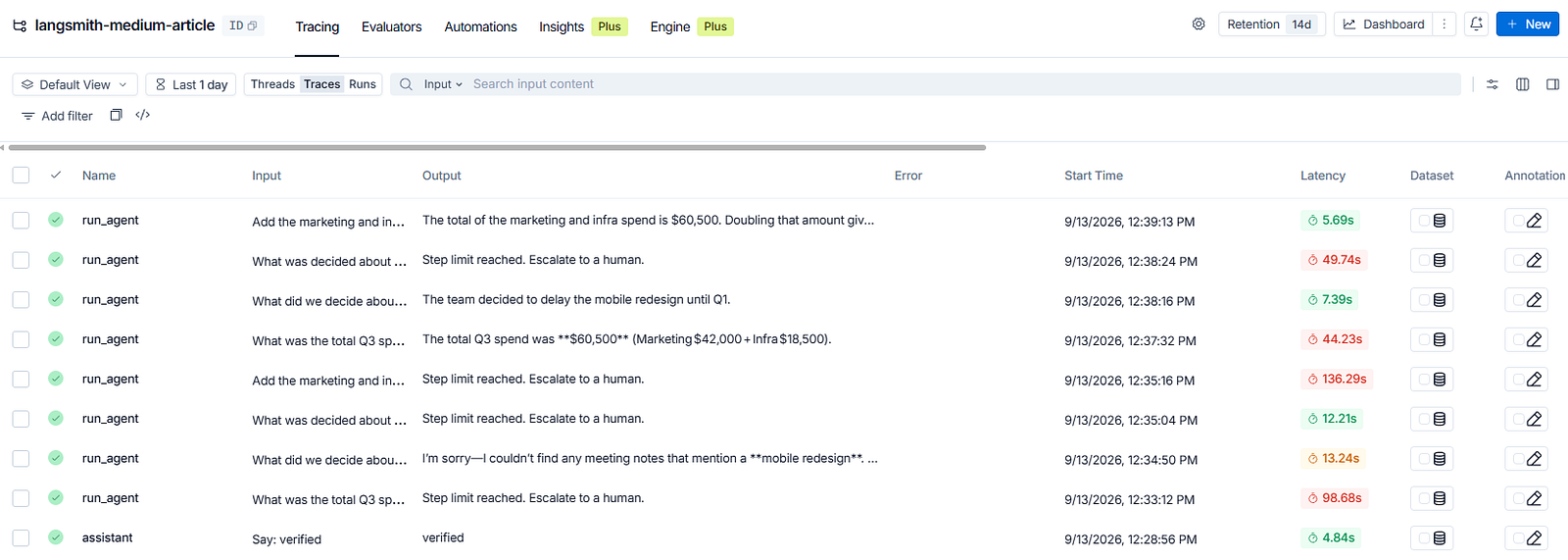
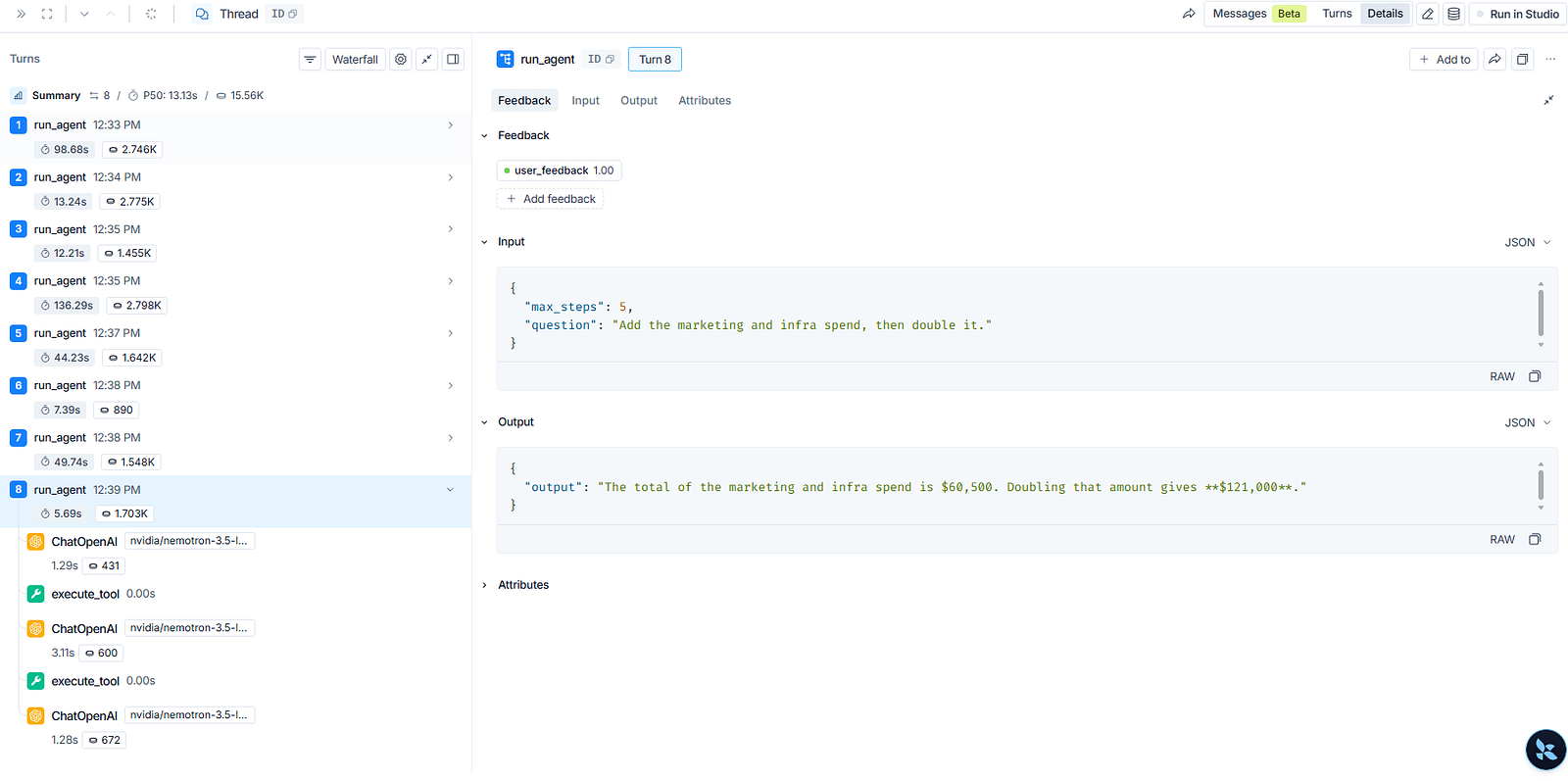
Run the demo and open the Tracing page in the LangSmith UI. Every run appears as one row, and opening a row shows the full run tree: the agent run, the tool runs nested under it, and the model calls nested under those, each with inputs, outputs, latency, and token cost.
Step 4: Threads and trajectories
A user conversation spans many agent runs. LangSmith groups them with a thread_id. Update the decorator on run_agent from Step 3:
@traceable(metadata={"thread_id": "support-agent-thread-001"})  # same decorator, plus the thread ID
def run_agent(question: str, max_steps: int = 5) -> str:
    ...
Every trace that carries the same thread_id appears as one thread, turn by turn. LangSmith adds a second view on top: the trajectory, a flattened list of every message exchanged in the session, in order. The thread keeps the nesting; the trajectory shows the conversation. Use the thread to debug execution, use the trajectory to read what happened.
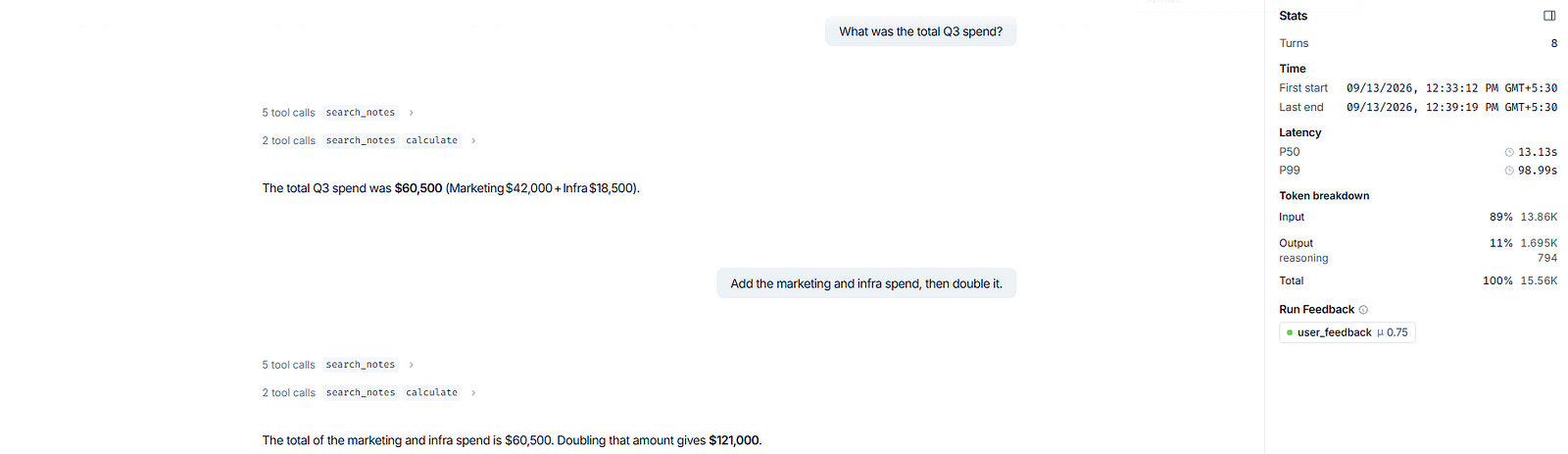
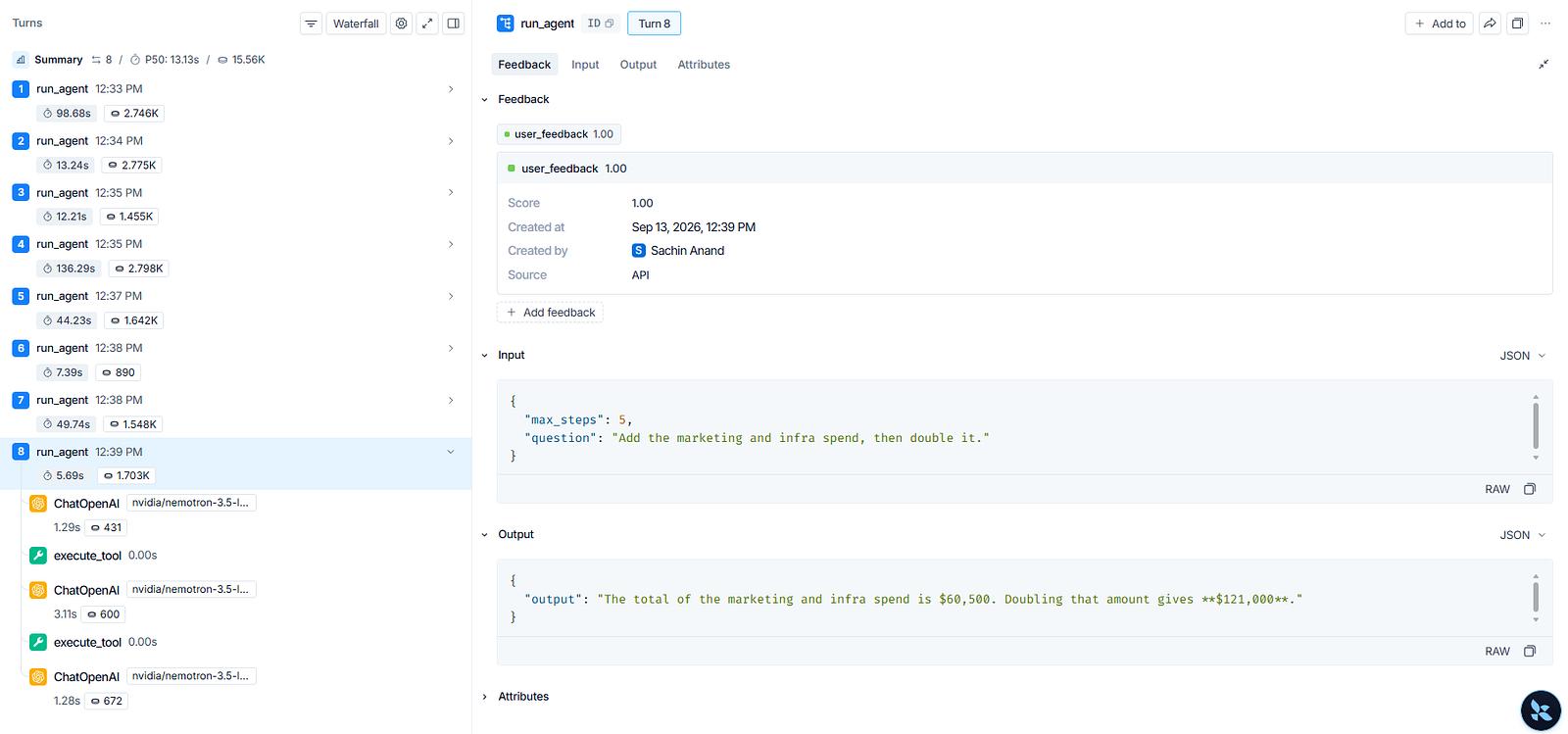
The thread stats tell the story in one glance: eight turns, feedback averaging 0.75, and a token breakdown that is 89% input — agent loops spend most of their budget re-reading context, not writing answers.
Step 5: Attach feedback to runs
A trace shows behavior. Feedback will add the judgment. Feedback is a score bound to a run by its run ID.
Who gives the score? In production, usually your users: a thumbs-up button in your app, wired to the run ID of that conversation. It can also be your code running automated checks, or a reviewer scoring runs manually in the LangSmith UI. In this demo there is no product UI, so the script scores its own runs: real answers get a 1, escalations get a 0. Same mechanics as a rating button, minus the button.
This block runs after your agent runs, in the same script or a separate scoring script:
from langsmith import Client

client = Client()

client.create_feedback(
    run_id,                # the ID of the run you are rating
    key="user_feedback",   # 1 = helpful, 0 = not helpful
    score=1,
)
Where does run_id come from? The demo gets it from the project itself: list the root runs (one root run per agent run), and score each one. This is the block at the end of the demo script:
roots = list(client.list_runs(project_name="langsmith-medium-article", is_root=True, limit=20))
for r in roots:
    question = r.inputs.get("question", "")                    # the question this run answered
    helpful = 1 if "Step limit" not in str(r.outputs) else 0   # 1 = answered, 0 = escalated
    client.create_feedback(r.id, key="user_feedback", score=helpful)
Prefer binary scores. A score of 1 or 0 forces a precise definition of correct behavior.
Step 6: Turn failures into datasets
LangSmith stores regression tests as datasets of examples. Each example holds an input and a reference output:
# the container that holds all your regression tests:
client.create_dataset(dataset_name="support-agent-regression")

# each item pairs a question with the answer that "correct" looks like:
client.create_example(
    dataset_name="support-agent-regression",
    inputs={"question": "What was the total Q3 spend?"},
    outputs={"answer": "$60,500"},   # the reference output: what a correct response contains
)

client.create_example(
    dataset_name="support-agent-regression",
    inputs={"question": "What did we decide about the mobile redesign?"},
    outputs={"answer": "Delayed to Q1"},   # another reference output
)
In the demo script, add this block at the very end, right after Client().flush(): the agent runs first, the traces get sent, and then the questions become dataset items. You can also run it as its own small script, as long as the dataset and examples are created at least once.
There is a shortcut for production failures: client.create_example_from_run(run_id, dataset_name=...) converts a real failing run into a dataset item in one call. Then run experiments: LangSmith executes your target function against every example, records the outputs and scores, and displays experiments side by side so you can compare prompt versions, models, or tool sets. A change ships only when the scores hold.
This is the closed loop for a non-deterministic system. You cannot replay a run exactly. You can test a change against every failure you have ever recorded.
Step 7: Evaluate with code, judges, and humans
LangSmith’s evaluation framework supports three techniques, and operations teams can use all three.
- Code evaluators are deterministic checks, written directly in the LangSmith UI as a
perform_eval(run, example)function. Did the agent callsearch_notesbefore answering? Does the output parse? Does the answer match the reference? The function returns a dict of scores, like{"exact_match": 1}. - LLM-as-judge evaluators score semantic quality, with or without a reference answer. You create one from a template (security, safety, quality), write the grading prompt, map your run’s fields into it, and define the rubric: boolean, categorical, or continuous. You can even feed the judge your own corrections as few-shot examples, so it aligns to your preferences over time.
- Human review through annotation queues collects ground-truth labels, and pairwise queues compare two versions side by side when absolute scoring is hard.
When several scores matter together, a composite evaluator combines them into one: a weighted average of, say, correctness and citation accuracy, attached back to the run as a single release score.
Run one experiment per application version, compare them on the same dataset, and gate releases on the scores. Offline evaluation validates before deployment; online evaluation monitors live traffic after it.
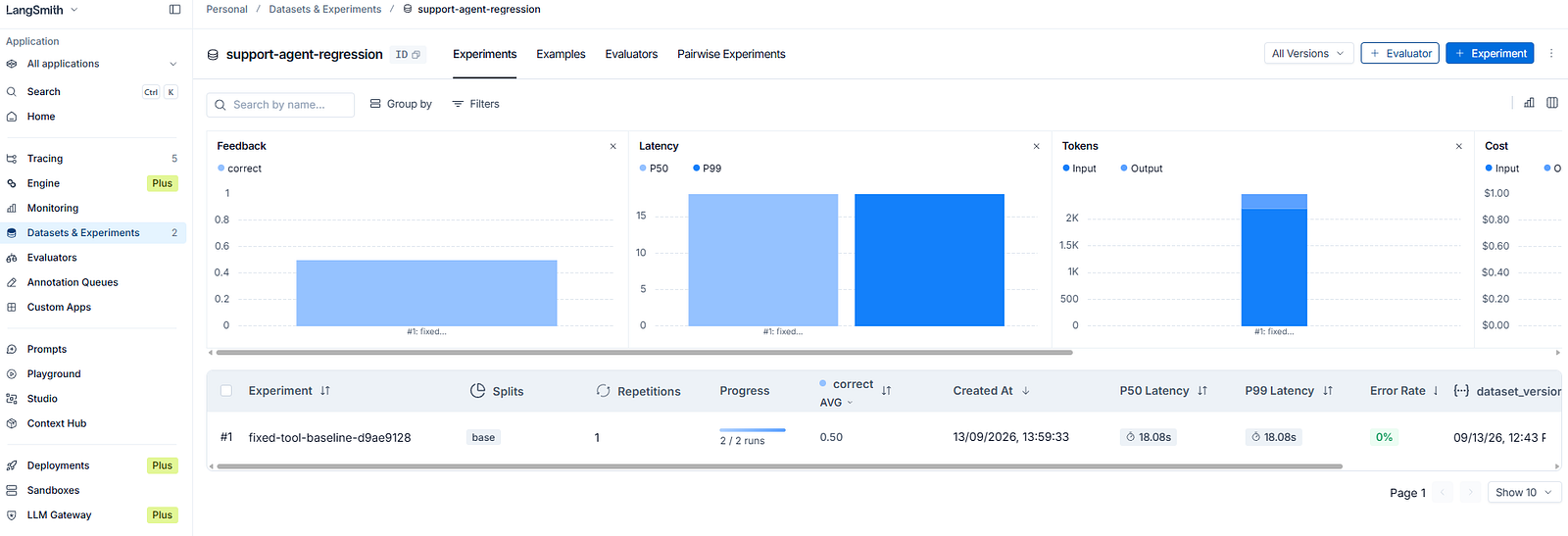

Note the second row: the agent’s answer was semantically correct, but my exact-match evaluator scored it 0 because the wording differed. Code evaluators check literal patterns. When wording varies, that is what LLM-as-judge evaluators are for.
Step 8: Monitor production
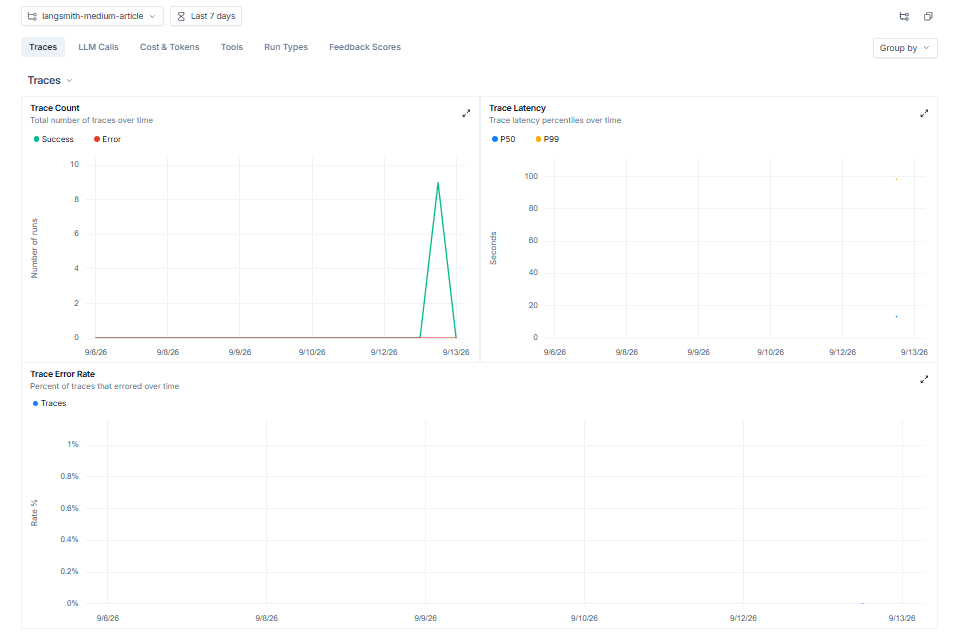
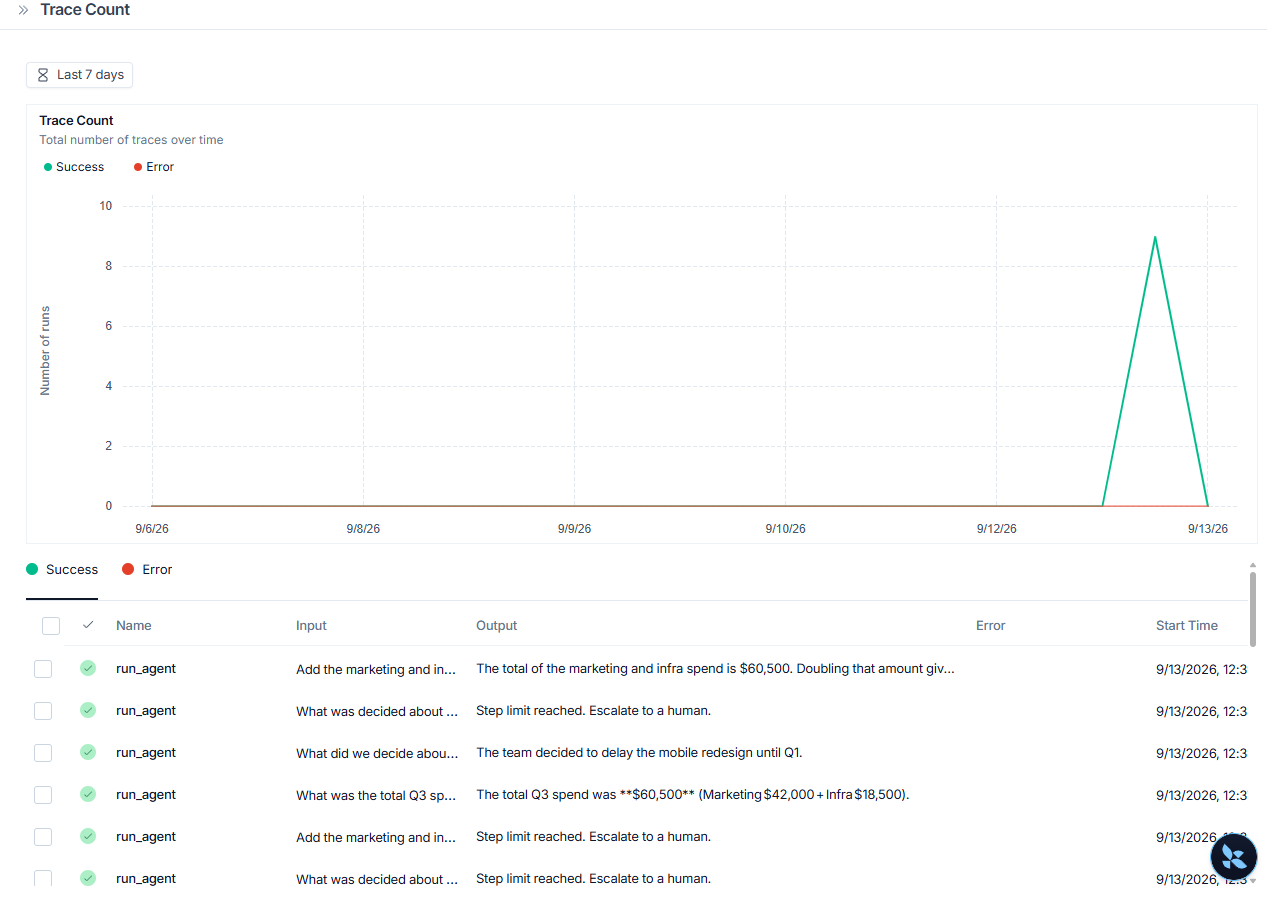
After deployment, you watch aggregates. LangSmith dashboards provides cost, latency, volume, and feedback over time, with alerts that fire through Slack, webhooks, or GitHub Actions when a metric leaves its range. Two agent-specific views carry the most weight: filter runs for a high tool-call count with a low distinct-tool count to find doom loops, and watch feedback trends after every release.
LangSmith also ships Engine, which detects recurring failure patterns in traces automatically and proposes fixes — worth turning on once your project has real traffic.
Step 9: Studio and Deployment
Two platform pieces sit on top of observability. LangSmith Studio is an agent IDE: it visualizes your graph, runs your agent interactively, manages threads and memory, and runs dataset experiments — with one-click deploy to LangSmith Cloud. LangSmith Deployment is the runtime for hosting agents (LangGraph, Claude Agent SDK, CrewAI, and others) with durable execution, threads, and streaming. For a monitoring-focused article it is enough to know they exist: observability, evaluation, and deployment share the same trace data.
LangSmith vs Langfuse, briefly
Both platforms trace non-deterministic agent workflows, and both are open source at the core. The differences from running the same agent on both: LangSmith’s threads and trajectories give the best conversation-level view, annotation queues and the experiments UI are the most mature offline-evaluation workflow, and the LangGraph integration is a single environment variable.
Langfuse answers with fully self-hostable data regions, prompt versioning with labels, and a lighter setup path for non-LangChain stacks. Pick by ecosystem: if you build on LangChain or LangGraph, LangSmith is the native choice; if you need strict data residency or a provider-neutral harness, Langfuse fits cleanly.
Best practices for non-deterministic workflows
- One trace per run. One thread per conversation. Name your projects deliberately.
- Use
run_typeon your traceable functions so tool runs are filterable. - Prefer binary feedback. Define “correct” precisely.
- Convert every production failure into a dataset item. Datasets persist even after traces expire (LangSmith retains traces for 180 days on SaaS plans; datasets are permanent).
- Run experiments before every release. Compare, do not hope.
- Turn on alerts before you need them.
Conclusion
A non-deterministic agent will fail many times, and you must record.
LangSmith gives that record a structure: runs for steps, traces for operations, threads for conversations, trajectories for the story, feedback for judgment, and datasets for regression testing.
The setup in this article takes less than one hour. The payoff starts with the first production failure, when you open the run tree and see the exact step where the agent went wrong.
Start with one decorator and one wrapper. Add datasets and evaluators when the first real failures arrive.